track editor 1.1 rev. L: Layers!


-
@HtH we want to fix your bug, but you'd have to give a more in-depth explanation of what is happening. if we can't replicate a bug, we can't fix it. could you could share the track code you are trying to import, or try to describe more about the situation?
-
oh my god i love yall ness and pie. praise be to yall
-
@Pie42 this is fantastic, congrats and thank you for creating this. I've found some bugs, of which you may or may not already be aware.
Bug: When using the select tool to move a line with "visible layers" selected, pressing undo will add that line to the current layer instead of its intended one. When I try this with "all layers" selected, it seems to break the editor. I can't zoom anymore, and lines start to disappear and glitch. The visible area also shrinks.
Possible bug: the "visible layers" erase option doesn't work. I tried with layers hidden as well; the eraser won't erase anything when that option is selected.
This is the track code I was playing with if that helps, you can see the colors changed where I ran into oddities.
[{"name":"Default","show":true,"defaultColors":false,"physColor":"#ff0000","scenColor":"#fb9d9d","code":"-18 1i 18 1i,90 -2l 97 -2,90 -2l 9q -2j ab -24 ag -1d ae -t a4 -c 9l -4 97 -2,ar -2k b2 -a cc -d,b0 -1d c2 -1g,ar -2l c3 -2o,d1 -8 cq -2r e5 -2u,cv -1k dl -1o,ej -8 f1 -32 g8 -c,ep -18 fp -1b,g9 -32 gk -15 gs -q h9 -l hm -m i1 -11 i1 -1m ho -36,i8 -35 im -i k6 -n,k4 -3b mc -3j,ld -3e li -o#8v m nd -d,n4 -40 8i -32 8u l,mr 4d n5 87 9n 9a,nd -d n4 -40#"},{"name":"Layer 1","show":true,"defaultColors":false,"physColor":"#0011ff","scenColor":"#a7bcfb","code":"9h 1n 9p 4e bb 4a,bl 4b bm 49 c7 1h d8 45,bv 37 cp 32,d1 1h dr 2n ec 1d,dr 2p e2 46,ep 1b ep 1f f8 43 gl 3t,eq 1d gg 16,f2 2s gf 2l,h1 1d hc 3t,h1 1a hf 13 ia 16 ik 1t id 2h hv 2l hd 2m io 3p,kb 15 kd 15 l6 j,ko 3o m3 3l,l6 j le 3k,ma 58 m8 5p,j2 58 j6 5p,ot 4q p7 7v#9j 52 ml 43,mb 9 99 1d 9j 52,nk 41 na 7#"},{"name":"Layer 2","show":true,"defaultColors":false,"physColor":"#00991f","scenColor":"#84d973","code":"9s 5s a4 8v c0 8p,cd 8q cv 5g e7 8l,ck 7e dl 79,ds 5e en 6o f3 58,en 6q ev 8l,fk 5d h0 55,fl 5f ft 8f h8 8a,fq 6u go 6r,hj 54 i4 4v in 50 j2 58,j6 5p j4 68 it 6g ig 6n hv 6n j7 85,kd 5h km 52 la 4r m1 4s ma 58,m8 5p ls 62 l0 7c kq 80 mo 7s#9b 5f mr 4d,9n 9a 9b 5g#"}]As an idea, would it be possible to change the opacity of layers based on hierarchy besides changing their individual colors? For example, it would allow me to see a physics line in my current layer despite there being physics lines behind it. Normally they would be indistinguishable. I may have explained that poorly, sorry.
Still this is awesome, I am grateful for your hard work.
-
@HtH we want to fix your bug, but you'd have to give a more in-depth explanation of what is happening. if we can't replicate a bug, we can't fix it. could you could share the track code you are trying to import, or try to describe more about the situation?
-
It would be nice to be able to move layers forward/back. Currently, creating a new layer puts it behind the default layer, and the easiest way to change the order is by moving around sections of the track code.
Also, I found a bug:
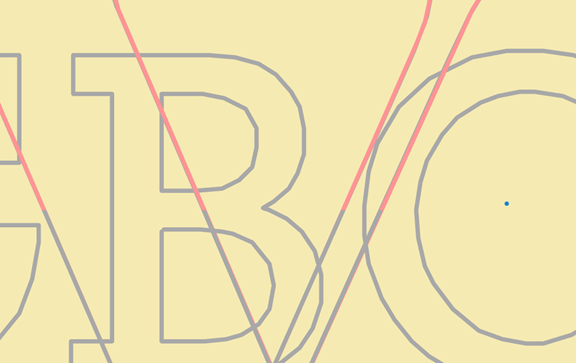
The base layer clips over my current layer while I draw lines over it, making my current layer hard to see in some spots. (pink lines are on top layer, gray are second layer)Jaded
-
It would be nice to be able to move layers forward/back. Currently, creating a new layer puts it behind the default layer, and the easiest way to change the order is by moving around sections of the track code.
Also, I found a bug:
The base layer clips over my current layer while I draw lines over it, making my current layer hard to see in some spots. (pink lines are on top layer, gray are second layer)@pawflix thank you for the bug report / feature request! layer render order is now fully guaranteed, with the current layer being rendered on top, and there are buttons in the layer settings to move layers up and down. the changes are currently only on gh pages, but should be added to the main site soon!
*note: there might be a bit of weirdness when moving layers with deleted layers. the easiest way to fix this is to export and re-import
-
@pawflix thank you for the bug report / feature request! layer render order is now fully guaranteed, with the current layer being rendered on top, and there are buttons in the layer settings to move layers up and down. the changes are currently only on gh pages, but should be added to the main site soon!
*note: there might be a bit of weirdness when moving layers with deleted layers. the easiest way to fix this is to export and re-import