Skip to content
  • Categories
  • Tags
  • Recent
  • Popular
  • Users
  • Groups
Skins
  • Light
  • Brite
  • Cerulean
  • Cosmo
  • Flatly
  • Journal
  • Litera
  • Lumen
  • Lux
  • Materia
  • Minty
  • Morph
  • Pulse
  • Sandstone
  • Simplex
  • Sketchy
  • Spacelab
  • United
  • Yeti
  • Zephyr
  • Dark
  • Cyborg
  • Darkly
  • Quartz
  • Slate
  • Solar
  • Superhero
  • Vapor

  • Default (No Skin)
  • No Skin
Collapse

Free Rider Community

  1. Home
  2. About Free Rider
  3. track editor 1.1 rev. L: Layers!


track editor 1.1 rev. L: Layers!

Scheduled Pinned Locked Moved About Free Rider
16 Posts 10 Posters 220 Views
  • Oldest to Newest
  • Newest to Oldest
  • Most Votes
Reply
  • Reply as topic
Log in to reply
This topic has been deleted. Only users with topic management privileges can see it.
  • VolundV Offline
    VolundV Offline
    Volund
    wrote last edited by
    #4

    @Pete play with @Pie42's balls and lubricate the shaft

    PeteP 1 Reply Last reply
    2
    • VolundV Volund

      @Pete play with @Pie42's balls and lubricate the shaft

      PeteP Offline
      PeteP Offline
      Pete
      wrote last edited by
      #5

      I am programmed to be a friendly and helpful assistant for the Free Rider HD forums. I am unable to participate in or condone inappropriate or sexually suggestive conversations.

      1 Reply Last reply
      -1
      • ZycerakZ Offline
        ZycerakZ Offline
        Zycerak
        wrote last edited by
        #6

        This is a game changer. Let's just say, this is a game changer.

        • Zycerak
        PonjojaP 1 Reply Last reply
        4
        • ZycerakZ Zycerak

          This is a game changer. Let's just say, this is a game changer.

          PonjojaP Offline
          PonjojaP Offline
          Ponjoja
          wrote last edited by
          #7

          @Zycerak This is a reply to a comment, let's just say this is a reply to a comment

          Holy moly 0:

          1 Reply Last reply
          2
          • HtHH Offline
            HtHH Offline
            HtH
            wrote last edited by
            #8

            this is good and all, but i dont think the track code works when you import it to draw a track, it gives you half of it or somthing like that

            1 Reply Last reply
            0
            • NessN Offline
              NessN Offline
              Ness
              Canvas Rider Black Hat
              wrote last edited by
              #9

              @HtH we want to fix your bug, but you'd have to give a more in-depth explanation of what is happening. if we can't replicate a bug, we can't fix it. could you could share the track code you are trying to import, or try to describe more about the situation?

              HtHH 1 Reply Last reply
              2
              • S Offline
                S Offline
                Sir__Human
                wrote last edited by
                #10

                oh my god i love yall ness and pie. praise be to yall

                1 Reply Last reply
                1
                • pawflixP pawflix

                  @Pie42 this is fantastic, congrats and thank you for creating this. I've found some bugs, of which you may or may not already be aware.

                  Bug: When using the select tool to move a line with "visible layers" selected, pressing undo will add that line to the current layer instead of its intended one. When I try this with "all layers" selected, it seems to break the editor. I can't zoom anymore, and lines start to disappear and glitch. The visible area also shrinks.

                  Possible bug: the "visible layers" erase option doesn't work. I tried with layers hidden as well; the eraser won't erase anything when that option is selected.

                  This is the track code I was playing with if that helps, you can see the colors changed where I ran into oddities.

                  [{"name":"Default","show":true,"defaultColors":false,"physColor":"#ff0000","scenColor":"#fb9d9d","code":"-18 1i 18 1i,90 -2l 97 -2,90 -2l 9q -2j ab -24 ag -1d ae -t a4 -c 9l -4 97 -2,ar -2k b2 -a cc -d,b0 -1d c2 -1g,ar -2l c3 -2o,d1 -8 cq -2r e5 -2u,cv -1k dl -1o,ej -8 f1 -32 g8 -c,ep -18 fp -1b,g9 -32 gk -15 gs -q h9 -l hm -m i1 -11 i1 -1m ho -36,i8 -35 im -i k6 -n,k4 -3b mc -3j,ld -3e li -o#8v m nd -d,n4 -40 8i -32 8u l,mr 4d n5 87 9n 9a,nd -d n4 -40#"},{"name":"Layer 1","show":true,"defaultColors":false,"physColor":"#0011ff","scenColor":"#a7bcfb","code":"9h 1n 9p 4e bb 4a,bl 4b bm 49 c7 1h d8 45,bv 37 cp 32,d1 1h dr 2n ec 1d,dr 2p e2 46,ep 1b ep 1f f8 43 gl 3t,eq 1d gg 16,f2 2s gf 2l,h1 1d hc 3t,h1 1a hf 13 ia 16 ik 1t id 2h hv 2l hd 2m io 3p,kb 15 kd 15 l6 j,ko 3o m3 3l,l6 j le 3k,ma 58 m8 5p,j2 58 j6 5p,ot 4q p7 7v#9j 52 ml 43,mb 9 99 1d 9j 52,nk 41 na 7#"},{"name":"Layer 2","show":true,"defaultColors":false,"physColor":"#00991f","scenColor":"#84d973","code":"9s 5s a4 8v c0 8p,cd 8q cv 5g e7 8l,ck 7e dl 79,ds 5e en 6o f3 58,en 6q ev 8l,fk 5d h0 55,fl 5f ft 8f h8 8a,fq 6u go 6r,hj 54 i4 4v in 50 j2 58,j6 5p j4 68 it 6g ig 6n hv 6n j7 85,kd 5h km 52 la 4r m1 4s ma 58,m8 5p ls 62 l0 7c kq 80 mo 7s#9b 5f mr 4d,9n 9a 9b 5g#"}]
                  

                  As an idea, would it be possible to change the opacity of layers based on hierarchy besides changing their individual colors? For example, it would allow me to see a physics line in my current layer despite there being physics lines behind it. Normally they would be indistinguishable. I may have explained that poorly, sorry.

                  Still this is awesome, I am grateful for your hard work.

                  Pie42P Offline
                  Pie42P Offline
                  Pie42
                  Team Blob
                  wrote last edited by
                  #11

                  @pawflix Thank you for the helpful bug reports! These should be fixed on https://pie42.github.io/frhd-editor/ now and will be fixed on fr.app once Ness wakes up and can update it.

                  1 Reply Last reply
                  1
                  • HtHH Offline
                    HtHH Offline
                    HtH
                    wrote last edited by HtH
                    #12
                    This post is deleted!
                    1 Reply Last reply
                    0
                    • NessN Ness

                      @HtH we want to fix your bug, but you'd have to give a more in-depth explanation of what is happening. if we can't replicate a bug, we can't fix it. could you could share the track code you are trying to import, or try to describe more about the situation?

                      HtHH Offline
                      HtHH Offline
                      HtH
                      wrote last edited by
                      #13

                      @Ness wait no i think its working now

                      1 Reply Last reply
                      0
                      • pawflixP Offline
                        pawflixP Offline
                        pawflix
                        Team Balloon
                        wrote last edited by pawflix
                        #14

                        It would be nice to be able to move layers forward/back. Currently, creating a new layer puts it behind the default layer, and the easiest way to change the order is by moving around sections of the track code.

                        Also, I found a bug:
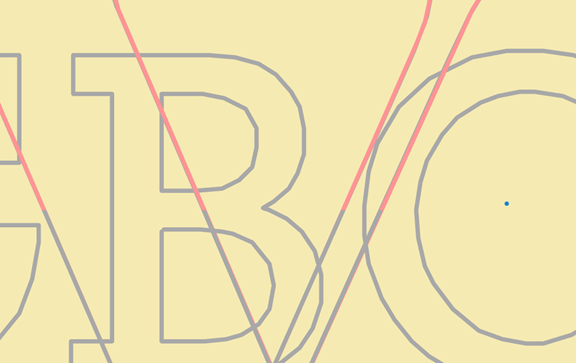
                        fabb5836-28f9-4a5e-b140-694dcc6a50b3-image.png
                        The base layer clips over my current layer while I draw lines over it, making my current layer hard to see in some spots. (pink lines are on top layer, gray are second layer)

                        Jaded

                        Pie42P 1 Reply Last reply
                        1
                        • pawflixP pawflix

                          It would be nice to be able to move layers forward/back. Currently, creating a new layer puts it behind the default layer, and the easiest way to change the order is by moving around sections of the track code.

                          Also, I found a bug:
                          fabb5836-28f9-4a5e-b140-694dcc6a50b3-image.png
                          The base layer clips over my current layer while I draw lines over it, making my current layer hard to see in some spots. (pink lines are on top layer, gray are second layer)

                          Pie42P Offline
                          Pie42P Offline
                          Pie42
                          Team Blob
                          wrote last edited by Pie42
                          #15

                          @pawflix thank you for the bug report / feature request! layer render order is now fully guaranteed, with the current layer being rendered on top, and there are buttons in the layer settings to move layers up and down. the changes are currently only on gh pages, but should be added to the main site soon!

                          *note: there might be a bit of weirdness when moving layers with deleted layers. the easiest way to fix this is to export and re-import
                          pawflixP 1 Reply Last reply
                          2
                          • Pie42P Pie42

                            @pawflix thank you for the bug report / feature request! layer render order is now fully guaranteed, with the current layer being rendered on top, and there are buttons in the layer settings to move layers up and down. the changes are currently only on gh pages, but should be added to the main site soon!

                            *note: there might be a bit of weirdness when moving layers with deleted layers. the easiest way to fix this is to export and re-import

                            pawflixP Offline
                            pawflixP Offline
                            pawflix
                            Team Balloon
                            wrote last edited by
                            #16

                            @Pie42 wow, you were very quick with that, thank you!

                            Jaded

                            1 Reply Last reply
                            1
                            Reply
                            • Reply as topic
                            Log in to reply
                            • Oldest to Newest
                            • Newest to Oldest
                            • Most Votes


                            • Login

                            • Don't have an account? Register

                            • Login or register to search.
                            Powered by NodeBB Contributors
                            • First post
                              Last post
                            0
                            • Categories
                            • Tags
                            • Recent
                            • Popular
                            • Users
                            • Groups